
CYBER BREACH INVESTIGATION SOFTWARE

Investigate a
cyber breach.

CICADA helps your team work out how an attacker got in, what they accessed, and what to do next.

It brings evidence from your security tools into one place, on a machine you control.
Try CICADA free
WATCH A BREACH INVESTIGATION

Inside CICADA IR

Free Community EditionNo credit card required
SEE THE ACTUAL SOFTWARE
CICADA / BREACH INVESTIGATION
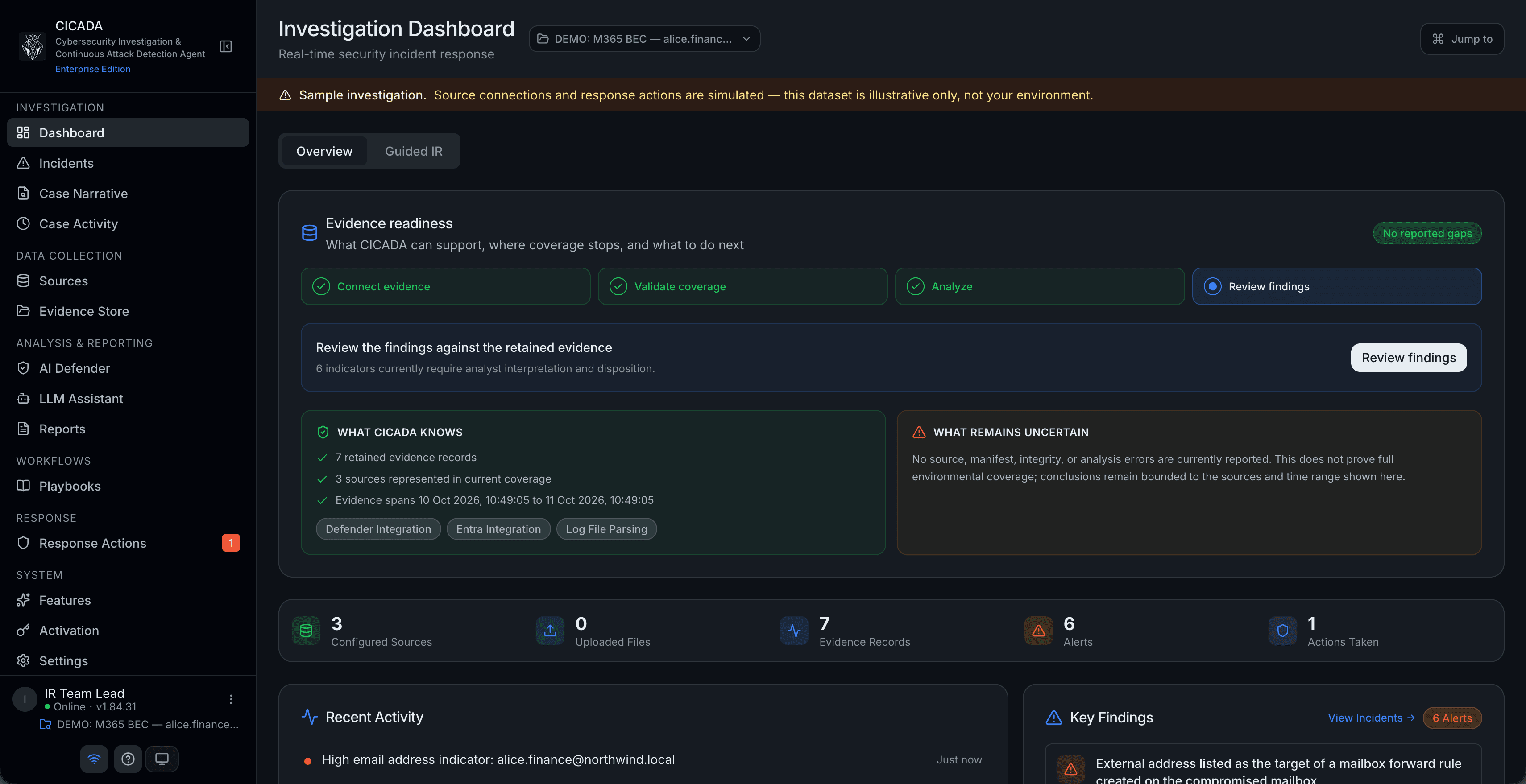
CICADA's current dashboard showing evidence readiness, findings to review and a clearly labelled sample breach investigation

Collect evidence. Follow the attack.
Work out what happened.

FOR IT TEAMS, SECURITY TEAMS AND BREACH INVESTIGATORS.See how it works

Works with the security tools you already use.

Microsoft DefenderCrowdStrikeMicrosoft EntraSophos TaegisMicrosoft 365
Supported connections · availability depends on your plan

WHAT CICADA HELPS YOU FIND OUT

After a breach,
start with these questions.

See how an investigation works
01

How did they get in?

Bring together records from your security tools. Follow the attacker’s steps across accounts and computers.

02

What was affected?

Look at which accounts and systems were involved. Use the evidence to work out how far the attack went.

03

What should we do next?

Review suggested actions with your team. Prepare a clear report for your management, insurer or regulator. Reporting is available on paid plans.

SEE WHAT HAPPENED

Your breach investigation.
In one place.

See the evidence. Follow the attack.
Keep your team on the same page.
This is the actual CICADA software.

ACTUAL SOFTWARE
cicada.local / overview
CICADA's current dashboard showing evidence readiness and findings for a sample breach investigation, in dark mode

See the breach in one place.

Review evidence from your security tools, spot suspicious activity and keep track of the investigation.

WATCH A BREACH INVESTIGATION

Inside CICADA IR

Oneplace to investigate the breach
Your networkruns the software and stores the evidence
15report types on paid plans
Youapprove actions that affect your systems

AI HELP FOR YOUR INVESTIGATION

AI helps you investigate.
You stay in charge.

Ask questions about the breach in plain language. The AI helps you read the evidence, understand suspicious activity and decide what to look at next.
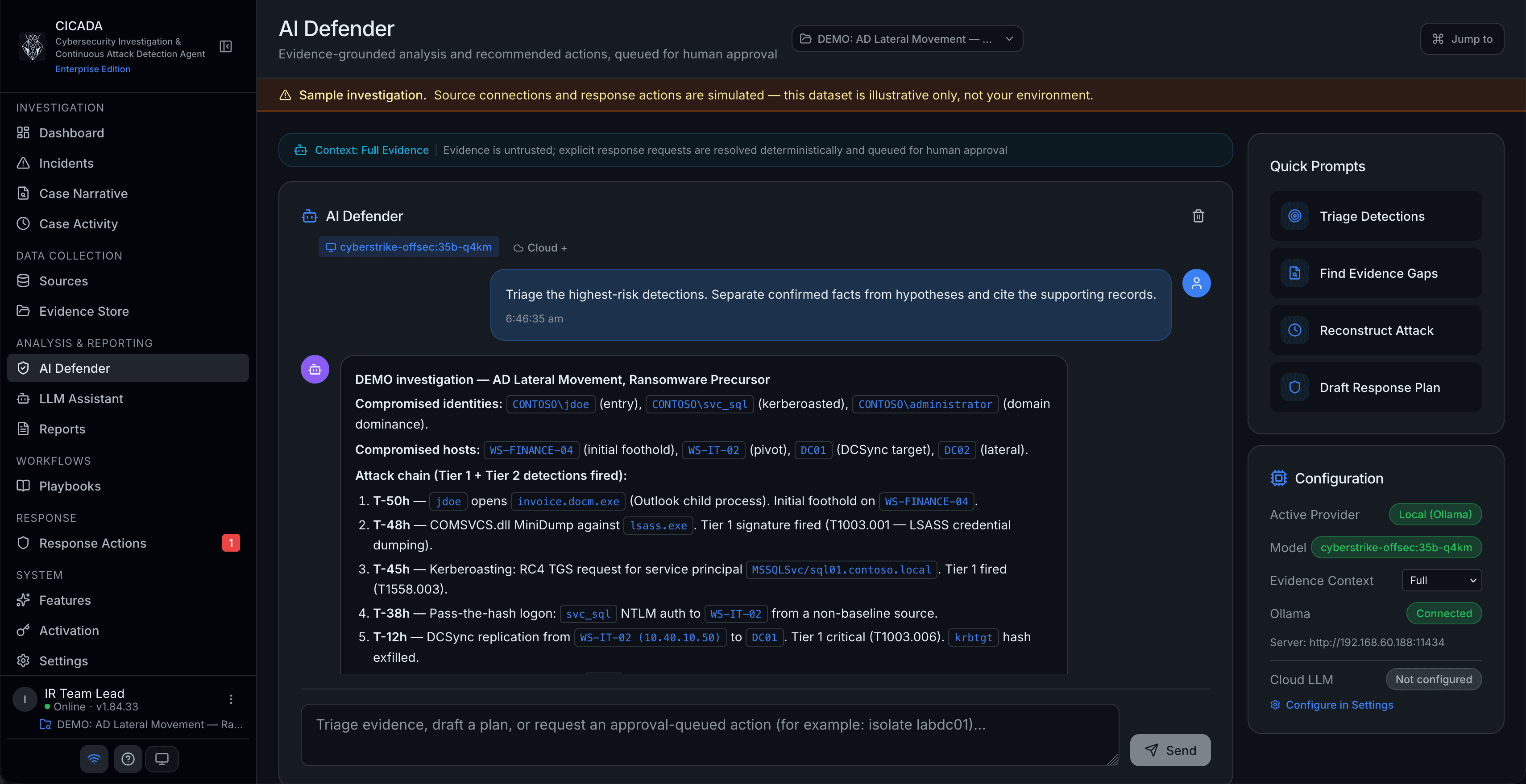
  • Use an AI model on your own network
  • Get help understanding the evidence
  • Approve actions before they affect your systems
See how the AI works
CICADA AI Defender analysing evidence from a sample breach investigation with a local AI model
AI ON YOUR OWN NETWORKActual software
Your team makes the decisions.

An authorised person reviews and approves disruptive actions.

YOUR EVIDENCE STAYS WITH YOU

Run it on your network.
Keep control of the evidence.

CICADA runs on your own machine and keeps the evidence there. Connect an AI model on your network to keep AI work there too. Outside AI services and threat databases are optional.

Visit the Trust Center

Runs on your machine.

Your IT team runs CICADA on your own network. The evidence and reports are stored on that machine.

You approve the actions.

An authorised person decides before CICADA disables an account or cuts a computer off the network.

Keep a record of the work.

CICADA tracks the evidence and records investigation actions, so your team can review the work later.

WATCH A BREACH INVESTIGATION

See CICADA
in action.

Watch how CICADA brings together evidence, helps investigate an attack and prepares the next steps.

WATCH A BREACH INVESTIGATION

Inside CICADA IR

WATCH A BREACH INVESTIGATION

Inside CICADA IR

QUESTIONS ABOUT CICADA

Before you get started.
Here’s what to know.

Looking for something specific?

Read the guides
What is CICADA?
CICADA is software that helps IT and security teams investigate a cyber breach. It brings together evidence from your security tools so you can work out how the attacker got in, what was affected and what to do next. See how an investigation works.
Where does the evidence go?
Evidence and reports stay on the machine running CICADA. If you use an AI model on your own network, the AI work stays there too. You can choose to use cloud AI or outside threat databases, but you must switch those connections on yourself. Explore the Trust Center.
Does CICADA replace my existing security tools?
No. CICADA reads information from the security tools you already use. It brings that information into one place to help your team investigate the breach. See supported sources.
Can the AI take action on its own?
The AI can suggest what to do. Actions such as disabling an account or cutting a computer off the network need an authorised person to review, approve and run them. Read the investigation workflow.
What is included in the free edition?
The free Community Edition includes the core tools for investigating a breach. Paid plans add more connections, analysis and reports. You can upgrade without moving or losing your existing investigations. Compare editions.
How do we get started?
Download CICADA and run it as a virtual machine on your own network. Connect your security tools and start an investigation. If you want AI help that stays on your network, connect an approved local AI model too. The setup guide walks your IT team through each step. Follow the setup guide.

GET READY FOR A CYBER BREACH

Be ready to investigate
your next cyber breach.

Start with the free edition, or talk to us about your team’s needs.

Cyber breach investigation. On your own network.